
Why Financial Literacy Starts With the Right App
Money conversations between parents and children often feel awkward or incomplete. Most families track expenses, but few actually teach the “why” behind smart spending decisions. That’s where modern family budgeting apps step in—they’re not just expense trackers anymore. Today’s best apps combine household budget management with built-in financial education tools, allowance automation, chore tracking, and even beginner investing features designed specifically for different age groups.
The statistics tell a compelling story: 57% of parents worry their children won’t learn proper money management skills, yet only 21% of families actively teach budgeting together. When you introduce the right app to your household, you’re not just organizing finances—you’re creating a real-time classroom where kids see cause-and-effect relationships with money.
The Best Multi-Generational Family Apps
HoneyDue: The Foundation for Couples Managing Families
HoneyDue ($0 free tier) is specifically designed for couples to manage shared and individual expenses, making it an excellent starting point for families ready to introduce older children to household finances[1]. Parents can link their accounts, set bill reminders, and designate which partner should receive notifications. For families with teenagers, HoneyDue’s transparency features—shared account views, transaction commenting, and bill tracking—teach kids how household money flows and what financial obligations look like in real life[1].

The app’s communication features are particularly valuable: you can chat within the app or comment on transactions, creating a dialogue about spending decisions rather than just monitoring them silently. This is how financial literacy actually develops[1].
Goodbudget: The Envelope System for All Ages
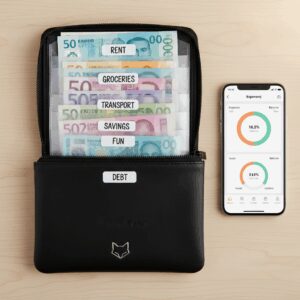
Goodbudget (Free with $80 annual premium) uses the virtual envelope method—a budgeting approach that translates beautifully for teaching kids[1]. Parents create envelopes for different spending categories, and once money in an envelope is spent, it’s gone. This visual, tangible approach helps children understand budget constraints without abstract explanations[1].</n
The app syncs across devices, so you can share envelopes with multiple family members and watch in real-time as kids learn to make choices within their allocated amounts[1]. For families with younger teens (ages 13-15), this envelope system is far more intuitive than traditional budgeting because it mirrors the physical allowance system many parents remember from their own childhoods.
Monarch Money: The Comprehensive Financial Dashboard
Monarch Money ($99 annually, 4.9/5 App Store rating) offers the most robust feature set for families managing complex finances[1]. It combines budgeting, investment tracking, goal management, and bill forecasting in one place. Parents can collaborate with unlimited people, making it ideal for blended families or households where grandparents contribute financially[1].
The app’s forecasting feature—which projects spending and savings for future months—is particularly powerful for teaching older teens about financial planning. When a 16-year-old can see how their spending patterns affect next month’s budget, the lesson sticks[1].
Apps Specifically Designed for Teaching Kids Money
For Ages 6-10: Building Foundation Habits
Younger children need visual, immediate feedback. Apps that track chores and connect them to small rewards work best at this age. While traditional family budgeting apps aren’t ideal for this group, parents can use Goodbudget’s envelope system to create a visual “allowance envelope” that kids help manage. Some families create their own system within Goodbudget: one envelope per child showing their allowance, another showing savings goals they’re working toward.
The key at this age: tangibility. A child who watches their “ice cream fund” envelope deplete after spending teaches themselves the cost of choices far better than any lecture[2].
For Ages 11-14: Introducing Responsibility and Choice
This is the sweet spot for introducing real budgeting. At this age, kids can understand the relationship between chores, allowance, and spending. HoneyDue and Goodbudget both work well here because they show the family’s broader financial picture while letting teens manage their own categories[1][2].
Setup strategy: Create a shared family budget view where kids can see (age-appropriately) how household money is allocated. Then give them their own envelope or sub-budget for discretionary spending. A 13-year-old managing a $50/month “fun money” envelope within a family budgeting app learns real constraints and trade-offs[2].

For Ages 15-18: Preparing for Financial Independence
Older teens benefit from the full feature set of Monarch Money or You Need a Budget ($109 annually). YNAB’s zero-based budgeting approach—where every dollar is assigned a purpose—is particularly effective for teaching intentional spending[1]. Many high schools now recommend YNAB in financial literacy courses because it forces teenagers to think about priorities rather than just tracking expenses.
At this stage, introduce investment tracking features. Monarch Money’s integration with investment accounts lets teens see how money can grow, demystifying concepts like compound interest and portfolio diversification[1].
Practical Setup: Getting Your Family Started
Step 1: Choose Your Primary App
Start with HoneyDue (free) if your family is just beginning to budget together. Upgrade to Monarch Money ($99/year) if you have complex finances or multiple generations involved. Both offer free trials, so test them before committing[1].
Step 2: Create Age-Appropriate Views
Don’t show your 10-year-old your mortgage and investment accounts. Instead, create simplified views showing overall family income, shared expenses (groceries, utilities), and individual allowances. Most apps allow you to control what each user sees[1].
Step 3: Establish Family Money Rules
Use the app’s commenting and communication features to make rules visible and discussable. For example: “Allowance is $20/week. You can save it, spend it, or split it between spending and savings.” Document this in the app so it’s always visible and can be referenced during disagreements[1].
Step 4: Review Together Weekly
Set a 15-minute weekly “money meeting” where the family reviews the app together. This isn’t about criticism—it’s about noticing patterns. “I see you spent your allowance by Wednesday three weeks in a row. What’s happening?” This conversation is where learning actually occurs[2].
The Real ROI: Building Financially Literate Adults
The apps themselves are tools—the real value comes from the conversations they enable. When your family uses a budgeting app together, you’re creating a shared language around money. You’re showing kids that spending decisions have consequences, that saving requires discipline, and that financial planning is something everyone does (not just rich people).
Start with HoneyDue’s free tier if you’re budget-conscious, or invest in Monarch Money if you want comprehensive features. Either way, the cost of the app ($0-$99/year) is trivial compared to the financial literacy your children will develop. That’s the real investment.
Unlock Full Article
Watch a quick video to get instant access.